Marker Tags: A Realistic Graffiti Font for Dynamic Web and Digital Design
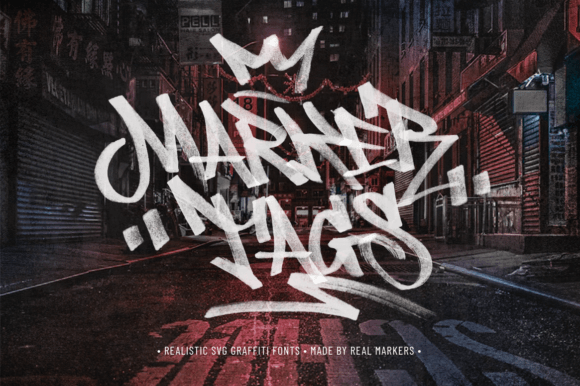
As a web designer, choosing the right typeface can make or break a digital project. Marker Tags stands out as a display font that brings authenticity and a street-style edge to modern web design. Created from real marker lettering and scanned for realism, this font captures the essence of graffiti and grunge without sacrificing digital clarity. It’s ideal for designers looking to inject personality into headers, hero sections, and brand-focused web experiences.
Marker Tags has a raw, hand-drawn texture that mimics actual marker strokes on paper. The uneven baseline and organic ink bleed give it a tactile, expressive quality. Despite its edgy appearance, it maintains legibility at larger sizes, making it perfect for digital headlines and visual accents. The font’s textured strokes add depth to web layouts, especially when layered over clean backgrounds or minimal UI elements.
How Marker Tags Enhances Visual Hierarchy and Brand Tone
In web design, hierarchy is key to guiding user attention. Marker Tags works best as a display font in hero titles, section headers, and call-to-action buttons. Its bold, attention-grabbing style makes it ideal for landing pages, creative portfolios, and boutique online stores where brand personality plays a central role. When used sparingly, it creates contrast against more neutral body fonts, reinforcing visual flow and readability.
For brand-focused websites—especially those in streetwear, creative education, or urban lifestyle niches—Marker Tags communicates authenticity and creative energy. It aligns well with brands that want to feel approachable, youthful, and expressive. Whether used in a logo, social media banner, or course sales page, the font sets a tone that feels handmade and human.
Practical Use Cases for Digital Designers
- Hero Headers: Use Marker Tags in bold, oversized titles for landing pages or product pages to create instant visual impact.
- Call-to-Action Buttons: Apply it to short, high-energy phrases like “Shop Now” or “Join the Movement” to draw clicks.
- Blog Headers: Add a graffiti-style header to featured articles or creative content sections to stand out in editorial layouts.
- Portfolio Websites: Perfect for designers, illustrators, or muralists who want to showcase their work with a matching typographic style.
- Digital Ads: Use it in banner ads or social media graphics to catch attention in fast-scrolling feeds.
When designing for conversion, readability and clarity matter. Marker Tags should be reserved for short, high-impact text rather than long-form content. It shines in headlines and accents but can become overwhelming in large blocks. For optimal performance, pair it with a clean sans serif or serif font for body copy, ensuring a balance between expression and usability.
Optimizing Readability Across Devices and Layouts
On mobile screens, Marker Tags performs best when used at larger sizes with ample spacing. Avoid using it on small buttons or dark backgrounds without testing contrast ratios. For image overlays, apply a light or dark semi-transparent background behind the text to maintain legibility. In responsive layouts, consider switching to a simpler font at smaller breakpoints to preserve clarity on touch devices.
For dark mode compatibility, test the font against both light and dark backgrounds. Some textured glyphs may appear less defined on dark surfaces. If needed, use a subtle text shadow or stroke to enhance visibility without compromising the font’s character.
Font Pairing Strategies for Web Design
Marker Tags works best when paired with minimalist, highly legible fonts. Consider these combinations:
- Sans Serif Body Text: Pair with Open Sans, Lato, or Montserrat for clean, modern layouts.
- Serif for Editorial Design: Combine with Georgia or Merriweather for a contrast between classic and expressive typography.
- Monospace for Tech Brands: Use with a font like Space Mono for a creative yet structured look in developer portfolios or coding course pages.
Font pairing should enhance both aesthetics and usability. When using Marker Tags as a headline, keep supporting typography simple to avoid visual clutter. This balance ensures the design remains focused and accessible across devices.
Technical Considerations for Web Use
Before integrating Marker Tags into a live website, verify the font’s webfont compatibility and file formats. Most premium display fonts include WOFF, WOFF2, and OTF versions for optimal browser support. Check for alternate glyphs, ligatures, and multilingual character sets if your audience spans multiple regions or languages.
For performance, limit the number of font weights used on a page. Since Marker Tags is a decorative font, it likely doesn’t require multiple weights like a body font would. Stick to one or two styles to keep load times fast and layout shifts minimal.
Licensing and Commercial Use
Always confirm that the version of Marker Tags you’re using includes a commercial license. Many premium fonts offer licenses for web use, client projects, online stores, landing pages, and digital templates. Using a properly licensed font ensures legal compliance and protects your brand from potential copyright issues. If you’re distributing the font as part of a design kit or theme, make sure the license explicitly allows for that use case.
Final Notes on Using Marker Tags in Digital Projects
Marker Tags is more than a stylistic choice—it's a tool for shaping digital identity and user engagement. Its textured, graffiti-inspired design adds depth and character to modern web layouts without compromising usability when applied thoughtfully. As a web or UI designer, using Marker Tags strategically in headers, callouts, and branding elements can elevate your design from standard to standout.
Whether you’re designing a creative portfolio, launching a streetwear brand online, or crafting a bold landing page, Marker Tags offers a unique visual voice. Paired with clean typography, optimized for mobile, and used with purpose, it becomes a powerful asset in your digital toolkit.